
Relight
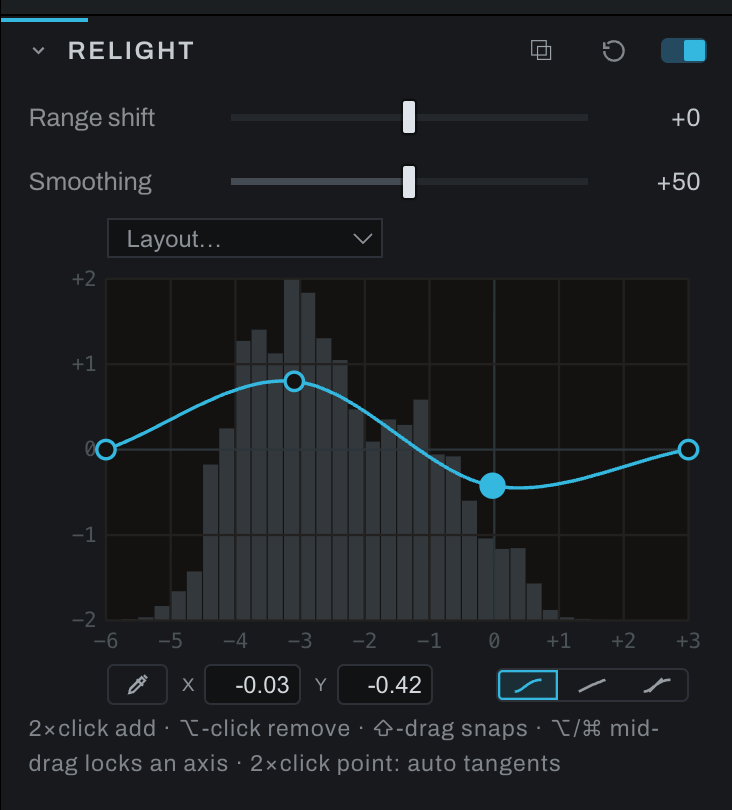
Relight is a tonal equalizer. Its graphical bands raise or lower brightness by zone, allowing more localized tonal shaping than a single contrast control. On an adjustment layer it follows the layer's mask, so a zone can be reshaped on one subject alone.
Controls
- Tone EQ widget edits tonal zones directly. The simplified face emphasizes shadows, midtones, and highlights; Graph exposes the complete nine-zone operation.
- Range shift moves the zones toward darker or brighter tones.
- Smoothing blends transitions between neighboring zones.
Drag a tonal zone up to brighten that range or down to darken it. Adjust Range shift when the affected part of the photograph does not line up with the desired zone. Increase Smoothing if the correction creates visible tonal boundaries.
Use the on-image picker to identify the tone under the pointer and work on the corresponding zone.
Placing points precisely
- The X and Y fields under the curve show the selected point's position and follow it live while you drag. Type a value and press Enter to place the point exactly; typed values are never snapped.
- Hold Shift while dragging to snap both axes to quarter stops.
- Hold Alt or Cmd while dragging to lock the drag to its dominant direction: mostly-vertical movement locks to Y, mostly-horizontal to X. Release and re-press to re-aim mid-drag. Combined with Shift, the moving axis snaps and the frozen one holds its exact value. Alt engages only after the drag has begun, since Alt-click removes a point; Cmd also works from the start.
- The Layout menu offers evenly spaced starting layouts, from every third stop down to one handle per stop, plus Empty for starting fresh: double-click adds the first point wherever the work is, and with no points the curve is an identity.
The three faces and the tangent handles
One button below the plot's right edge wears the curve's face and cycles it with each click: Smooth (the automatic curve through the points), Straight (rulers between them), then Tangent handles, and round again. Its hint names the face it will switch to. The same button and the same handle grammar appear in Recolor, Curves and the black and white Hue curve.
In Tangent mode, click a point and its handles appear at their true lengths; drag one to steer and stretch the slope, and a longer handle holds the curve to its line further. The sibling handle mirrors the drag, length included. Alt/Cmd-click a handle to break the pair so the two sides move independently; Ctrl-click a handle, or double-click the point, to return its tangents to automatic, pairing and all. Section Reset puts the starting layout back.
Hold the on-image picker while its tone is read, then drag vertically to adjust that zone. Releasing before the answer arrives cancels the drag. The picker reads the input of the Relight node you armed, including a separate instance in Graph. Changing that node while the read is pending keeps your newer settings.