Lens
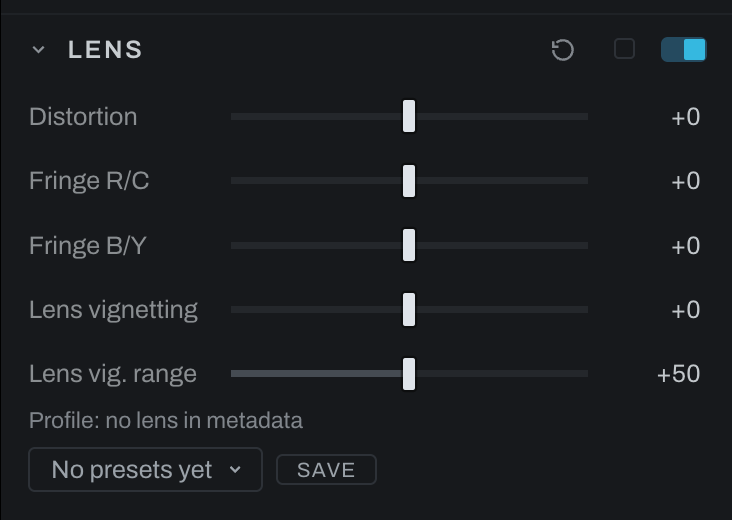
Lens corrects geometric distortion, chromatic fringe, and vignetting. Profile support may prefill or guide corrections; the manual controls remain available.
Controls
- Distortion corrects barrel or pincushion curvature.
- Fringe R/C corrects red/cyan lateral chromatic separation.
- Fringe B/Y corrects blue/yellow separation.
- Lens vignetting brightens the corners back up to undo the falloff the lens put there.
- Lens vig. range controls how far that correction reaches toward the center.
Profiles
The profile line in this section names the profile Heeler found for this photograph, and Apply writes it onto the controls in one step you can undo:
- From the file. Many phones and drones, and some cameras (Google Pixel, DJI, Leica, GoPro and others), write a correction for their own lens into a DNG file. It was made for that camera and lens, so it comes first. A photograph that carries one starts with it on the first time you open it, and the line reads Profile: from the file. Switch the section off to see the photograph without it.
- From the lens database. Otherwise Heeler looks the lens up in its profile database, and Apply writes the distortion, fringe and vignetting the database has for it at the shot's focal length.
- Your own preset. A lens preset you saved replaces either of these, since it is the whole lens state.
The lens correction runs ahead of Crop & Rotate, on the whole frame the camera recorded, so cropping, straightening, rotating or flipping the photograph never moves it off the lens. Straightening edges can expose empty corners, which the crop then takes out. Inspect high-contrast edges near the frame at 100% while adjusting fringe.
The controls here undo what the glass did. For a falloff you want, use Vignette, and correct first: working the other way makes this correction fight a look you chose.