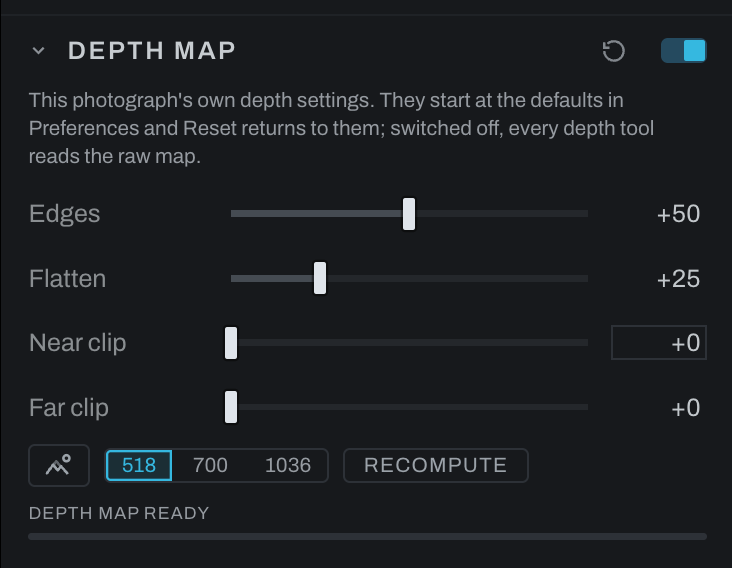
Depth Map
Fog, Depth Lighting, Depth of Field, Recolor's depth row and Lens Character all read one depth map: the photograph's near-to-far plane, inferred by the depth model the first time any of them asks. Depth Map is where that plane is tuned. The section sits above the tools that use it, and a change here changes all of them at once.
The model answers at a fixed, modest size and its answer is stretched to the photograph, so every edge between a near thing and a far one arrives as a soft ramp, and on plain surfaces the model can invent shape from a shadow. Depth Lighting shows both at once: an embossed rim around a subject, and ripples across a flat wall. Depth Lighting itself no longer shades across an occlusion, since a cliff between a near thing and a far one is not a surface facing the light; the controls here clean up the map that every depth tool reads, using the photograph itself as the guide.
Controls
- Edges snaps the depth's edges onto the photograph's. Higher takes more of the halo off a subject against its background.
- Flatten smooths the depth across what the photograph shows as flat: walls, sky, skin. Higher takes more of the ripple out; a real edge between two surfaces is kept.
- Near clip and Far clip fold the nearest or farthest slice of the scene into the end of the range, as a share of the picture. When one close thing eats most of the depth, or the far end is one flat wall or sky, a few percent here spreads the rest of the scene back across the range.
- Detail chooses the size the model reads the scene at: its own 518 px, or 700 or 1036 for finer edges. Each step up costs about twice the time of the last, and the largest also asks for more memory.
- Recompute reads the scene again from scratch, at the current settings.
- Levels is the map's own: the same three-handle widget a layer's Depth mask carries, over the raw plane's histogram. Below Black reads as farthest, above White as nearest, Gamma bends the depths between, the two falloff handles on the top edge soften either end so a cut through the plane's soft edge does not draw a matte line, and every depth tool and every depth mask is handed the shaped map. Each of Fog and Depth Lighting has a Levels of its own on top of it, for that section alone.
- View depth shows the photograph as its depth map, white near and black far, so you can see what the tools below will read. Invert Depth in Depth Lighting flips the view with it. The same eye sits on every section that reads the map, so you can check it from wherever you are editing.
Adjustment layers and Finish layers read the same map through their Depth mask block, so one setting here shapes every depth user at once. Switching the section on refines the map; off returns every depth tool to the raw plane. A moved control recomputes the map when you let go. The status line at the foot of the section says when the map is ready and what the last read took; while a read runs it shows a bar with the time it expects, learned from the reads it has already done at that size this session, and the tools and View depth keep the old map until the new one lands.
The settings are the photograph's own: the section is born with the defaults set in Preferences under Models (Edges, Flatten and Detail), Reset returns it to them, and changing the preferences later touches no photograph that already has its section. Switched off, every depth tool reads the raw map, not the preferences. Start with the defaults, turn View depth on, and raise Edges until the rim around your subject is gone, then Flatten until the flat surfaces stop rippling. Push either past what the photograph needs and fine depth detail starts to go with it.