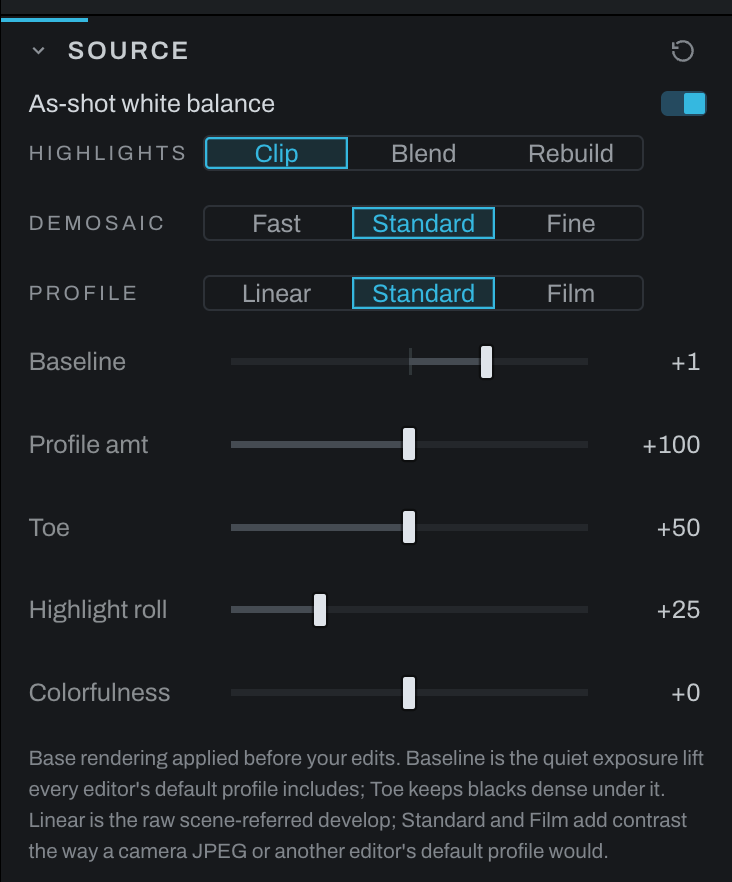
Source
Source controls raw decoding and the base tone rendering applied before creative adjustments. It is always present and has no enable switch.
Raw controls
- As-shot white balance uses the camera's recorded white-balance multipliers. Turn it off when you want the later Color section to begin from a neutral decoder state.
- Highlights: Clip cuts blown sensor channels at white.
- Highlights: Blend fills a blown channel from the channels that survived.
- Highlights: Rebuild reconstructs blown areas and rolls off their color.
- Demosaic: Fast uses the quickest, softest interpolation for culling.
- Demosaic: Standard uses the decoder's normal quality.
- Demosaic: Fine uses slower DHT processing to resolve fine detail.
Tone profile
- Linear is a scene-referred raw development without a display-style contrast profile.
- Standard applies a conventional camera/editor starting profile.
- Film applies a more film-like base contrast.
- Baseline sets the quiet exposure lift applied before later edits.
- Profile amt controls profile contrast in Standard and Film and is hidden in Linear.
- Toe keeps blacks dense under the baseline lift.
- Highlight roll compresses bright values into the display range.
Choose demosaic quality for the stage of work: Fast while rapidly culling, Standard for routine editing, and Fine when judging detail or exporting. Choose the tone profile before building the rest of the look, because it changes the starting contrast under every later section.
Use the Metadata tab for file and camera facts. Graph's source and tone-profile inspectors expose the same operations in node context.